
Download Flickr Viewr – Free Flickr Slideshow Viewer for Windows & macOS
Overview
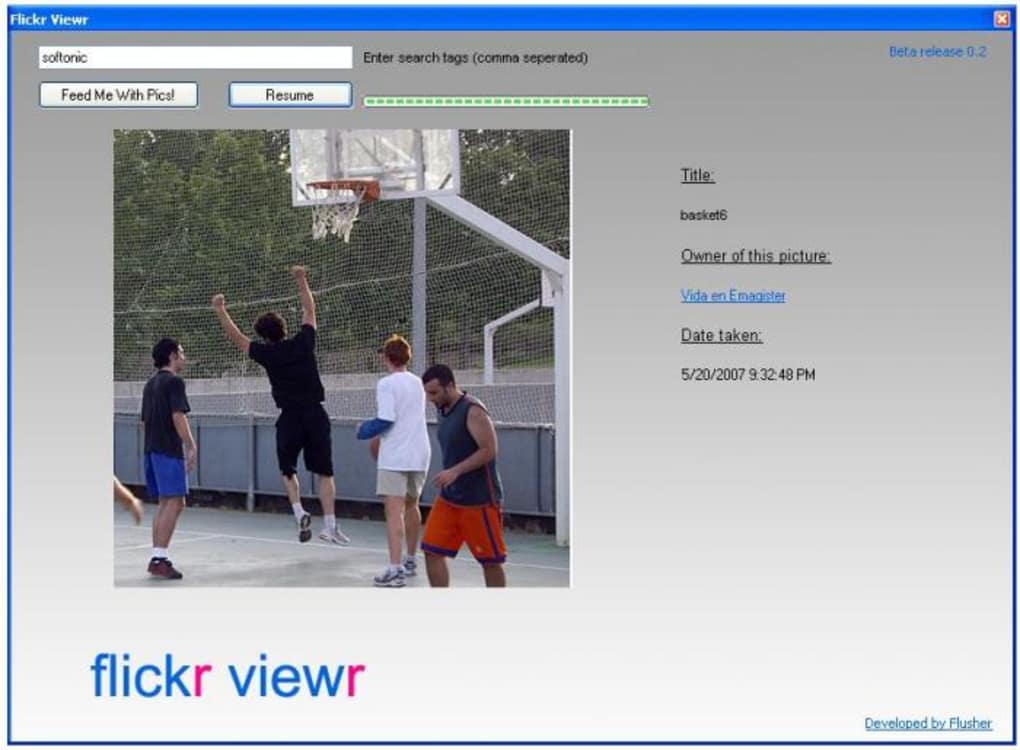
Flickr Viewr is a lightweight desktop utility that lets you explore the massive Flickr photo archive without ever opening a web browser. The core idea behind the app is simple yet compelling: you type in one or more tags, and the program pulls matching images from Flickr, presenting them in a continuous, automatically advancing slideshow. For users who love to discover visual inspiration while working on a document, browsing a photo library on a separate monitor, or simply enjoying a curated stream of pictures while sipping coffee, Flickr Viewr offers a distraction‑free experience. Because the software runs as a native Windows or macOS application, it consumes far less RAM than a full‑blown browser session and eliminates the clutter of tabs, address bars, and ads. The interface is intentionally minimal – a single search box, a start/stop button, and a full‑screen mode that hides the operating system’s taskbar. While the concept is original and the execution is smooth, the tool stops short of offering advanced capabilities such as bulk downloading, wallpaper integration, or custom slideshow transitions. Nevertheless, for anyone looking for a quick, secure way to view Flickr photos offline‑style, Flickr Viewr delivers on its promise with a clean, responsive design that respects both bandwidth and user attention.
Key Features
- Tag‑Based Search: Enter any Flickr tag (or a combination of tags) and the app instantly retrieves relevant images from the Flickr API.
- Automatic Slideshow: Images appear in a seamless, timed slideshow that can be paused, resumed, or set to loop.
- Full‑Screen Mode: Toggle to true full‑screen for an immersive viewing experience that hides the desktop UI.
- Lightweight Engine: The application runs with a minimal memory footprint, making it ideal for older PCs or laptops.
- Secure API Connection: All communications with Flickr are encrypted via HTTPS, ensuring your searches remain private.
- Cross‑Platform Support: Available for Windows 10/11 and macOS 10.15+ with a consistent look and feel.
- Auto‑Update Checks: The program checks for updates at launch, keeping you on the latest stable build without manual effort.
- Simple UI: One‑click start/stop, easy tag entry, and intuitive navigation arrows keep the learning curve flat.
Installation & First‑Time Usage
Getting started with Flickr Viewr is straightforward. First, download the installer from the official website – the file is named FlickrViewr-Setup.exe for Windows or FlickrViewr.dmg for macOS. Run the installer and follow the on‑screen prompts: accept the license agreement, choose an installation folder (the default works for most users), and click “Install.” Once the process finishes, launch the application from the desktop shortcut or the Applications folder.
Upon opening the app, you’ll see a clean window with a single text field labeled “Enter tags.” Type in one or more tags separated by commas – for example, sunset, beach, travel – and press the “Start Slideshow” button. Flickr Viewr instantly contacts the Flickr API, retrieves a curated set of images, and begins displaying them in a 5‑second interval. You can adjust the interval speed in the Settings menu, accessed via the gear icon in the top‑right corner. If you wish to pause the slideshow, simply click the pause button; the current image will remain on screen until you resume.
For users who prefer a more focused view, click the “Full‑Screen” button (or press F11) to hide the window borders and dock. To exit full‑screen, press Esc. The app also remembers your last used tags, so when you reopen it, the previous search is automatically reloaded, saving you time. If you encounter any connectivity issues, check your internet connection and ensure that your firewall allows outbound HTTPS traffic on port 443 – Flickr Viewr only needs to reach api.flickr.com.
Compatibility, Pros & Cons
- Windows 10 / Windows 11 (64‑bit)
- macOS 10.15 Catalina and later (Intel & Apple Silicon)
Pros
- Zero‑browser browsing: Enjoy Flickr photos without the overhead of a web browser.
- Fast and responsive: The lightweight engine loads images quickly, even on slower connections.
- Secure data handling: All API calls are encrypted, protecting your search queries.
- Cross‑platform consistency: Identical experience on Windows and macOS.
- Free to use: No hidden fees or subscription model.
Cons
- No download option: Users cannot save images directly to their computer.
- Lack of wallpaper integration: The app cannot set images as desktop backgrounds.
- Limited slideshow customization: No transition effects, timers, or playlist controls.
- Author‑only linking: Clicking an image opens the photographer’s Flickr profile, not the image URL.
- Tag‑only search: No support for text search within titles or descriptions.
Frequently Asked Questions
Can I download images directly from Flickr Viewr?
No, the current version of Flickr Viewr does not provide a built‑in download feature. The app is designed solely for viewing purposes, respecting Flickr’s licensing terms. If you need to save an image, you must visit the photographer’s Flickr page and use Flickr’s own download options (when permitted).
Is Flickr Viewr compatible with Windows 7 or older macOS versions?
Officially, Flickr Viewr supports Windows 10/11 and macOS 10.15 Catalina or later. Older operating systems are not tested and may encounter stability issues. Users on legacy platforms are encouraged to upgrade or use the web version of Flickr instead.
How does Flickr Viewr handle my privacy?
All communication with Flickr’s API occurs over HTTPS, which encrypts your tag queries and image data. The application does not store personal data or share your searches with third parties. However, Flickr itself may log search activity according to its own privacy policy.
Can I customize the slideshow speed or transition effects?
You can adjust the slide interval in the Settings menu, but Flickr Viewr currently offers only a basic fade transition. More advanced customization, such as custom animations or per‑image timing, is not available in the free version.
Is there a way to set a Flickr image as my desktop wallpaper using Flickr Viewr?
Unfortunately, Flickr Viewr does not include a wallpaper‑setter feature. You would need to manually download the desired image (via Flickr’s website) and then set it as your background through your operating system’s personalization settings.
Conclusion & Call to Action
Flickr Viewr fills a niche for users who want a quick, distraction‑free way to browse Flickr’s vast image library without launching a browser. Its tag‑based search and automatic slideshow deliver a smooth visual experience while keeping system resources low. Although the lack of download, wallpaper, and deeper customization options may disappoint power users, the core functionality is solid, secure, and completely free. If you’re looking for a lightweight tool to spark creativity or simply enjoy a rotating gallery of themed photos, give Flickr Viewr a try. Download the installer now, enter your favorite tags, and let the images flow.
Download Flickr Viewr today and start exploring Flickr’s visual world without the clutter of a web browser.







